How to Schedule Parent Meetings in Kidsday
Kategori:
 Planner
İçin Faydalı:
This feature allows administrators to schedule meetings with parents in a clear and structured way, by setting specific time slots and sharing the purpose of the meeting. For example, a meeting can be organized to discuss a child’s development during a particular period.
Why is it important?
-
Simple meeting organization – every parent knows the exact time slot of their meeting.
-
Effective communication – parents receive a clear invitation with the meeting’s purpose.
-
Efficient planning – you can create multiple time slots for the same purpose and manage all meetings in one place.
Steps to schedule a meeting
Step 1: Open the calendar
-
From the main menu, click on Calendar.
.png)
Step 2: Select the date
-
Click on the date when you want to schedule the meeting,
or use the “Add +” button on the top right.
Step 3: Choose the category
-
From the list of categories, select Meeting.
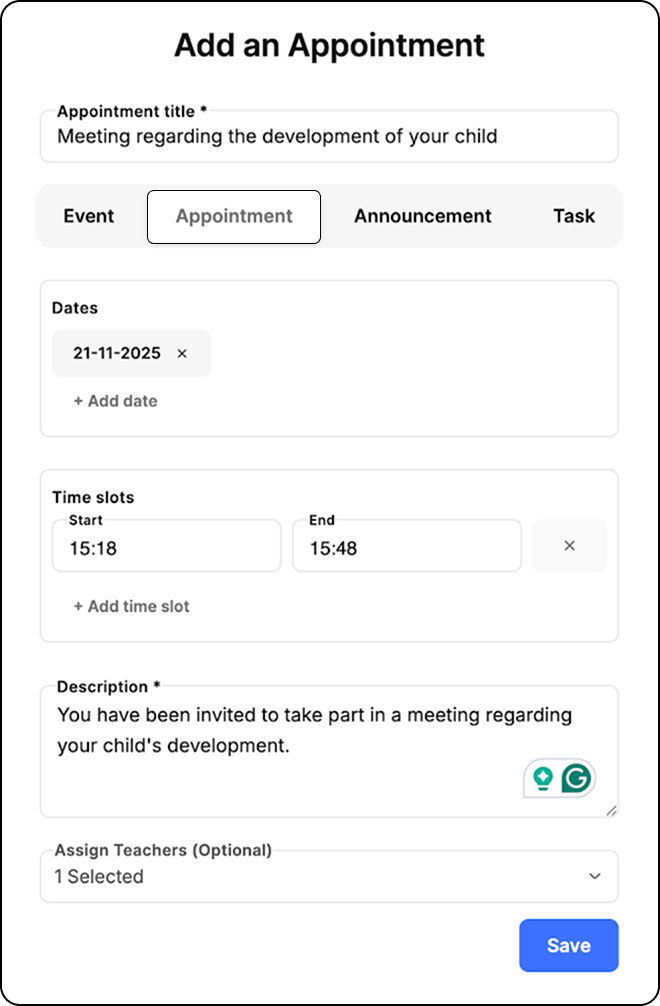
Step 4: Fill in the meeting details
-
Enter the title of the meeting (e.g., Meeting about child development).
-
Add a description: You are invited to attend a meeting to discuss your child’s development for the period September – October.
-
Set the time slots that parents can choose from.
Step 5: Save and share
-
Click “Save” to send out the invitations.
-
Parents will then be able to select their preferred time slot and access all details about the meeting.