How to Create Development Form
Kategori:
 Settings
İçin Faydalı:
Admin
In our app, tracking and assessing the developmental progress of children is made efficient and comprehensive through the dedicated feature: Development Reports.
Follow these steps to harness the power of detailed assessments and customized forms tailored to your kindergarten's specific requirements:
• Navigate to Settings then Development Reports
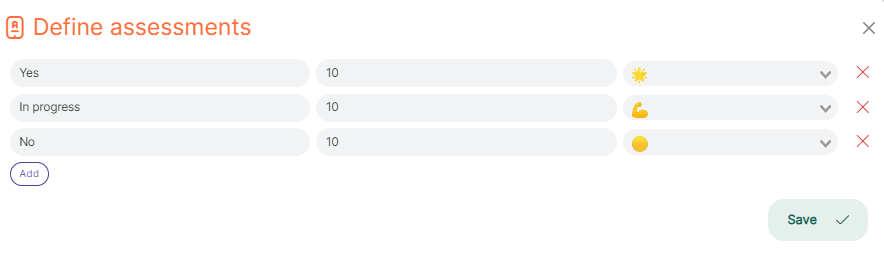
- Assessments:
- Click on Assessments to initiate the assessment process.
- Define assessments using descriptive text, visual symbols, and assign formal numeric values for a nuanced understanding of each child's development.
- Capture the essence of a child's progress through carefully chosen words and symbols, ensuring a rich and meaningful representation of their journey.
- Create a New Form:
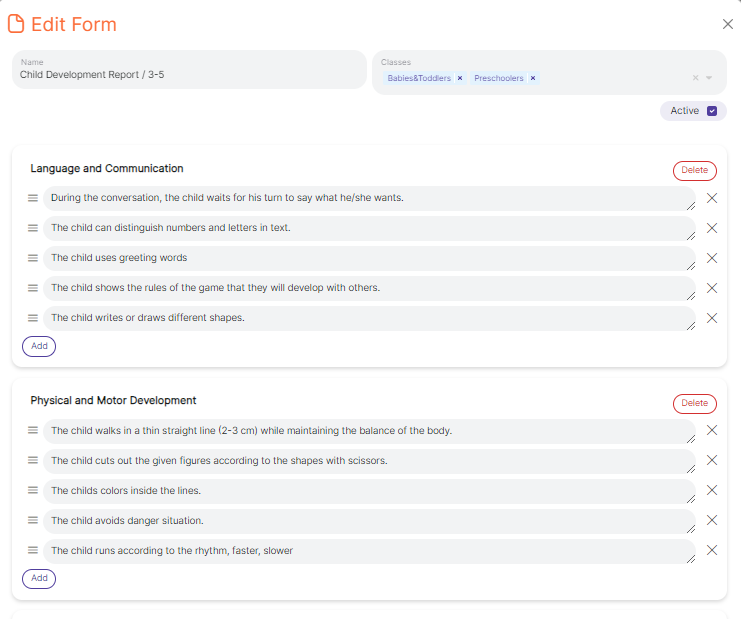
- Choose the option "Create a Form" to design a customized developmental form.
- Align the form with your kindergarten's development standards or adhere to specific regulations.
- Tailor the form to address key areas of child development, fostering a holistic approach to assessment.
- Capture pertinent information that aligns with your kindergarten's unique goals and objectives.