




With the Digitization of our Kindergarten with kidsday, we have saved at least 1 hour of time during the day. Additional time that can be dedicated to more children.

Gentiana Rrustemi
Director at AMA
Organize your students, manage daily attendance, and foster a focused learning environment with a centralized dashboard designed for modern educators.
Spend less time on logistics and more time on learning.
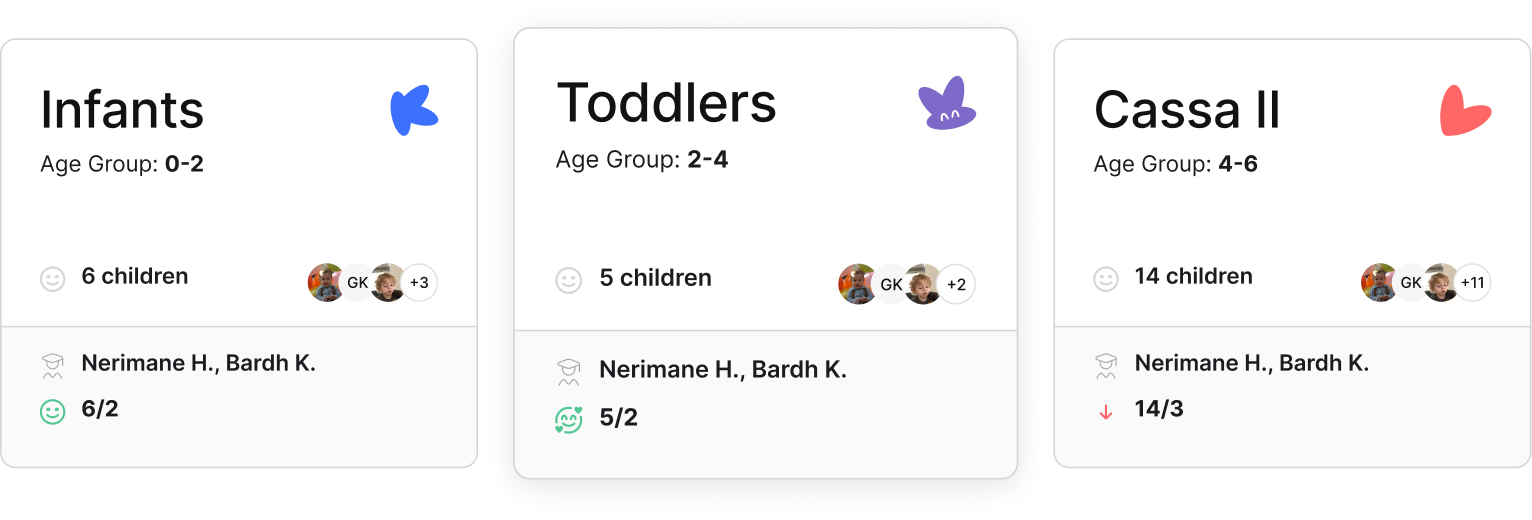
Visual Clarity. Admins can see the entire center at a glance through a gallery of beautifully designed class cards.
Instant Switching: No "Back" buttons required. Simply click the current class name to drop down a menu and teleport into another room instantly.
The "Live" Pulse: If your program is set to a 5:1 ratio, the system monitors exactly how many staff and children are physically in the room.
Smart Detection: As a child is checked in or a teacher takes a lunch break, your ratio updates live. It is the ultimate tool for compliance and peace of mind.
More about Staff AttendanceEmail Integration: Invite educators directly via email.
Auto Attach: When they join, they are automatically tethered to their specific class, permissions, and children. No manual data entry, no "oops, I forgot to add the teacher."
More about Staff ManagementAttendance at a Glance: Filter children by status - who is present, who is absent, and who is currently napping.
Daily Report Integration: Tap a child's profile to view or update their daily reports immediately. It's a seamless loop between "checking them in" and "sharing their wins."
More about Children Attendance
Childcare name
Gëzimi Ynë
Industry
Childcare / Daycare
A successful example of digital transformation in early childhood education.
Gezimi Ynë ‘16
Center
Refining the Classroom Experience
The Old Way
Guessing if you are out of ratio during staff breaks.
Scrolling through endless menus to find "Class B."
Manually assigning teachers to rosters.
Generic, boring lists of names.
The kidsday Way
Real-time alerts based on live clock-in data.
One-tap switching from the top of the screen.
Auto-attach via email invitations.
Icon-driven, color-coded visual dashboards.
With the Digitization of our Kindergarten with kidsday, we have saved at least 1 hour of time during the day. Additional time that can be dedicated to more children.
Gentiana Rrustemi
Director at AMA
The partnership with kidsday has been a natural step for us. Our goal has always been to create an environment where children develop, learn, and have fun, while parents feel safe and informed.

Biyana
CEO La casa dei Bimbi
kidsday helps us structure our entire daily organization from the very first hour of the day to the last.

Antonyia
Director
Kidsday has helped me and my staff a lot in creating an online and technological "file" that you can use anywhere and anytime without having to spend so much time and financial resources on papers. It has also given us very good opportunities and it is not just a simple daily report as it also includes observations and evaluations for the children which make the work much more professional and helps us to be in step with world trends.

Qendresa L.
Director - Eco Kids CC
Overall, very great! Have been looking for an education management app for months that has a clean UI, easy and simple to use, has messaging features, and can track attendance while also track students progress. And kidsday is just perfect! Would definitely recommend everyone to check it out!

Wulan D.
Founder, Head Tutor
One of the main advantages of the application is time saving! By sharing information on a stable online platform, kidsday reduces the need for physical documentation and manual processes, making the staff's work easier and reducing time and financial costs for the kindergarten.

Arta T.
Manager at Kiddy Academy
kidsday app is a flawless solution for planning, communicating, and documenting kindergarten activities, fostering strong parent-teacher bonds for optimal child development. Every parent's dream app!

Edona Th.
Director at Kids Avenue
Thanks to the amazing kidsday team for the great platform! Our kindergarten now keeps parents connected with daily online updates, enhancing their involvement and understanding of our children's activities.

Lida H.
Director at LET Center
Our Kindergarten has reduced the need for printed documents and this has helped us as an institution in our efforts to protect the environment by reducing the use of paper.
Erëza M.
Manager at Kids Club
By allowing parents to follow the daily activities of children and providing a transparent reporting tool, this app has helped in communication and cooperation between educators and parents. With real-time information, it has become easy to monitor and track children's development in an efficient and convenient way.

Finesa
Manager at Kids Academy
It helps us organize schedules, track children's attendance and communicate with parents efficiently. This makes our job easier and more efficient in managing garden tasks.

Zana K.
Director at The Magic Kindergarten
Thanks to kidsday, effortlessly sharing children's activities and progress has become a seamless process.At day's end, I'm not just a more professional educator, but a more relaxed one too.

Egzona M.
Educator at Stina Education Center
It has effectively streamlined management tasks and provided parents with regular updates about their children, resulting in increased peace of mind.

Liridona N.
Director at Blini Kindergarten
kidsday provides regular updates on nutrition, sleep, activities, and availability, giving parents peace of mind. It enhances communication and fosters a commitment to children's well-being.

Albina K.
Director at Pathway
Digitizing with kidsday makes monitoring kindergarten performance and staying updated on daily events effortless, enhancing overall engagement and communication.

Dayschool Prishtina
Center
As it has had a great impact on informing parents about the development and well-being of their children from a more detailed report in various areas such as: daily activities, food, sleep and going out in nature...

Arbenita S.
Director at Stina Education Center
Parents love it for improving communication, making our Kindergarten experience complete in every way.

Gëzime Ç.
Director at Bardha Academy
From real-time updates to seamless communication, it’s transformed how we teach and connect with families.

Lorik Zhitia
Education Program Director of LET Center
I used to write everything down and give verbal reports—now I log meals, naps, and activities in seconds. It keeps me organized, and parents love the photo sharing the most!

Gresa Krasniqi
Pre-K Teacher of Pathway
With my second child, I get real-time updates, photos, and daily reports—it truly makes my day happier.

Arta Istrefi Jahja
Parent
A Game-Changer for Our Center! Our Teachers love the ease of use and the simplicity of kidsday

Bardha Çollaku
Manager of 8 Chilcare Settings


