
The Schedule tab sets when your center is open.
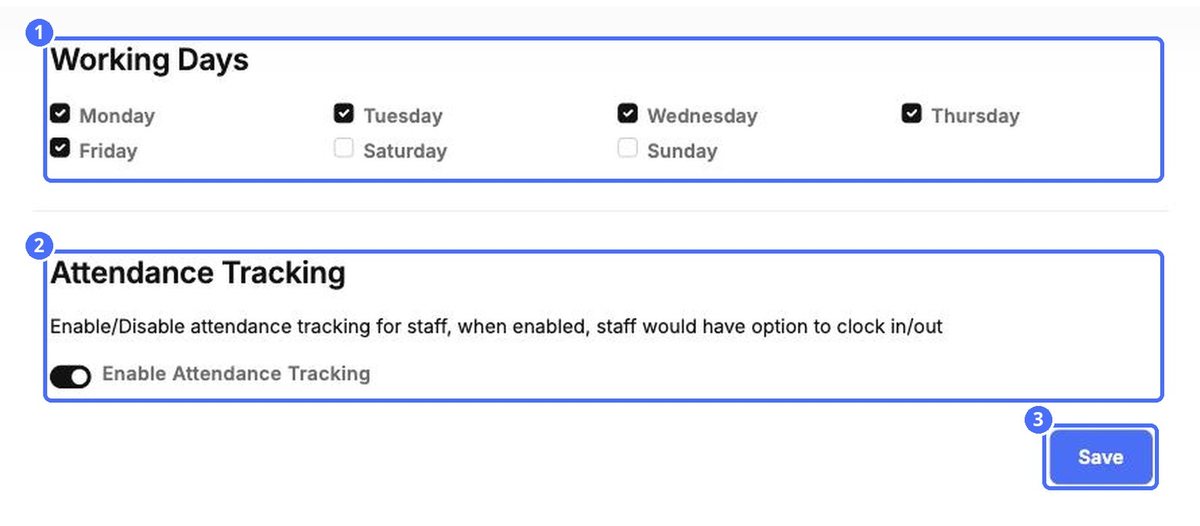
- Under Working Days, tick the days your center is open.
- Switch on Enable Attendance Tracking to let staff clock in and out. Their hours then appear in Time sheets.
Choose the days your center is open and let staff clock in and out.
The Schedule tab sets when your center is open.
The weekly hours grid now lives in HR › Timesheets, with leave shown on the same grid. Register hours and export the week.
Update your logo, name, business number, childcare language, time zone, description and contact details.
Quick answers about notification language, time zones, messaging hours, invite codes and changing your plan.


