
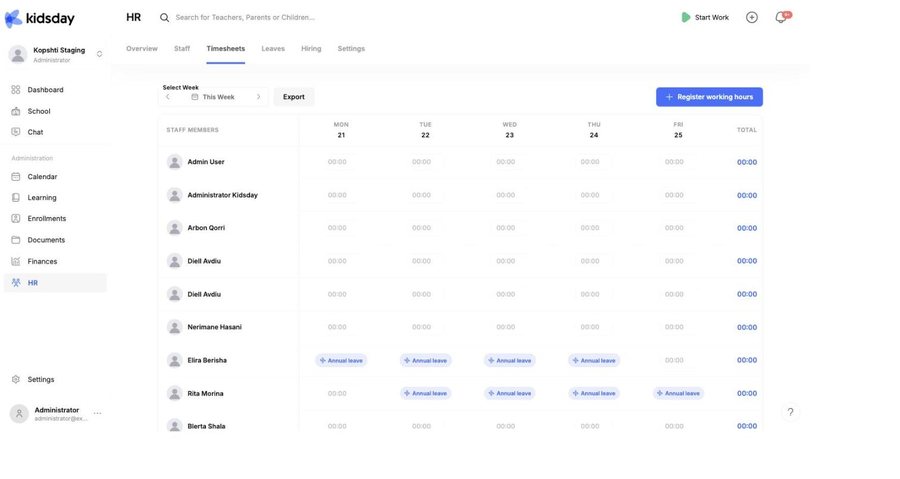
HR › Timesheets is the week at a glance: every staff member down the side, the days across the top, and the hours in between. This is the module that used to be called Time sheets; it now sits inside HR so that hours and leave appear on the same grid.
Reading the grid
- Each cell holds the hours worked that day, as hh:mm. 00:00 means nothing was logged.
- Total on the right adds up the person's week.
- Where someone is on approved leave, the cell shows the leave type in its colour instead of a time. A day marked Annual leave is not a missing entry.
- Use the ‹ and › arrows beside This Week to move between weeks.
Register hours
- Select Register working hours at the top right.
- Choose the staff member, the day and the hours.
- Save. The cell updates straight away.
Teachers log their own hours from the staff app; administrators can log hours for anyone, which is what you want when somebody forgot to clock in or worked an unplanned shift.
Tip: The Start Work button in the top bar is the other way in — it starts a live shift for the person signed in, and stops it at the end of the day.
Contracted hours
When somebody has Weekly hours on their employment record, their profile compares the two under This week — hours logged against hours contracted. Without an employment record there is nothing to compare against, so the card reads No contracted hours set.
Export
Export downloads the visible week as a spreadsheet: one row per person, one column per day, plus the total. Move to the week you need first — the export follows what is on screen.
Tip: For a monthly payroll run, export each week of the month and keep the files together. The totals column is the one payroll needs.
Note: Children's attendance is separate and lives under School. Timesheets covers staff only.


