
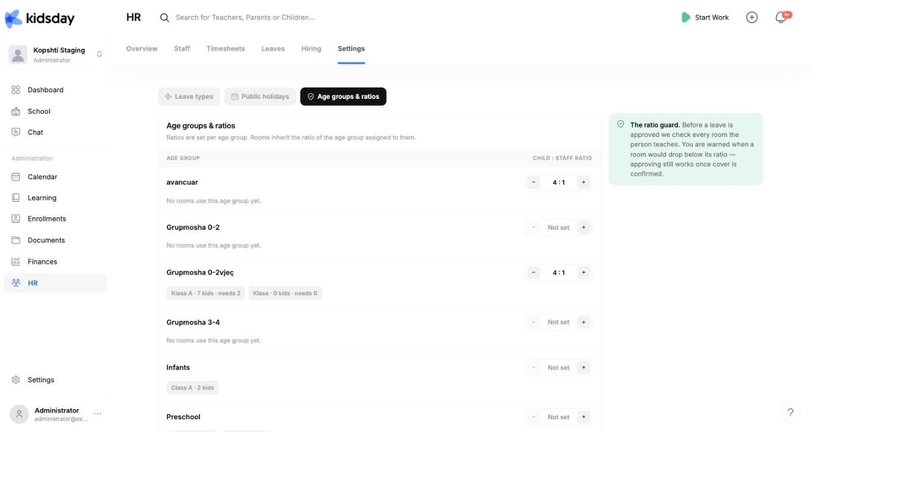
A ratio says how many children one member of staff may look after. It depends on how old the children are, so it belongs to the age group, and every room inherits the ratio of the age group assigned to it.
Note: Where it is set. Age groups and their Room ratio are managed in School › Rooms › Settings — click the pencil icon on an age group. This page in HR lists the same age groups and ratios, because HR is where they are used.
Where the ratio is set
- Go to School › Rooms and click Settings to open Manage Age Groups.
- Click the pencil icon on the age group.
- Set its Room ratio — for example 4 : 1 — and save.
- To check what you have set across every age group, open HR › Settings › Age groups & ratios.
In HR › Settings › Age groups & ratios, each age group shows its ratio and, underneath, chips for the rooms using it and what that means in practice — “Klasa A · 7 kids · needs 2”. An age group no room uses yet says so.
Not set
An age group showing Not set is not being checked. Its rooms appear as No ratio set on the Overview's room coverage card, and leave requests for the staff who teach them carry no ratio verdict. Nothing breaks — but nothing is being watched either.
Tip: Start with the age groups you actually use. Ratios for babies and toddlers are the ones that catch problems; an unused age group can wait.
The ratio guard
This is what the ratios are for. As the note on the page puts it: before a leave is approved we check every room the person teaches. You are warned when a room would drop below its ratio — approving still works once cover is confirmed.
So a ratio here has three visible effects:
- Room coverage today on the Overview says Covered, or shows you the shortfall.
- Every leave request gets a Ratio OK badge or a warning naming the room and the days.
- The room chips on this page tell you how many staff each room needs at its current headcount.
Use your regulator’s numbers
Ratios are set by law and they differ by country, by region and sometimes by the qualifications of the staff in the room. kidsday does not assume a set of rules — enter the ones your inspectorate applies to you, and review them when the regulations or your age bands change.
Tip: After you change a ratio, open the HR Overview. Room coverage updates immediately, so you can see straight away whether today still works under the new number.


